
 Your Name
241deb5136 |
2 hours ago | |
|---|---|---|
| internal | 2 hours ago | |
| .gitignore | 2 hours ago | |
| README.md | 2 hours ago | |
| diagram.png | 2 hours ago | |
| go.mod | 2 hours ago | |
| go.sum | 2 hours ago | |
| main.go | 2 hours ago | |
| matrix.example.sh | 2 hours ago | |

README.md
readonly-sql-api
This code was generated by LLM agent powered by Qwen3.8 27B
A small Go HTTP service that exposes a read-only view of a postgres database, reached over an SSH tunnel, responses rendered as Markdown.
Designed to be used as a tool by an LLM agent to inspect the schema/data in a postgres database.
How it works
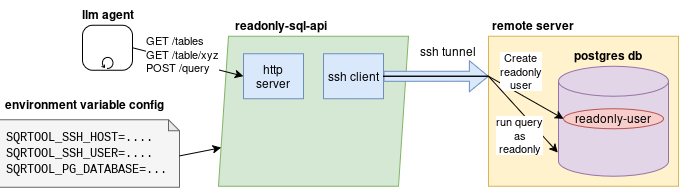
On startup, the tool will create the SSH tunnel and create the readonly role.
It prints out a little blurb like this to its stdout:
## Database Access Tool

You may use this tool to inspect the <database_name> database. Connect to the tool to view its instructions: `curl -sS -H 'Authorization: Bearer <authtoken>' http://somehost:8080`
You would simply copy-paste that blurb into your LLM agent along with a description of its task, for example, writing code to interact with the database, or answering a question about the data in the database.
If the LLM tries to create/update/delete anything, it will get permission denied.
Security model
- The admin credential is only used within the tool's internals, to create/refresh the read-only role.
- arbitrary queries sent by the LLM agent always run as the read-only role, which is
NOSUPERUSERand hasSELECTbut noINSERT/UPDATE/DELETE/TRUNCATE.
Bootstrap modes
| Mode | How the role is created | When to use |
|---|---|---|
ssh (default) |
runs sudo -u <admin> psql over the SSH connection (peer auth, no password) |
the SSH login user can sudo to the postgres OS user |
tcp |
connects as the admin user with a password over the tunnel | the admin DB user has a password and can create roles |
The admin user defaults to postgres (Override with SQRTOOL_PG_ADMIN_USER)
Configuration (environment variables)
| Variable | Default | Meaning |
|---|---|---|
SQRTOOL_LISTEN_ADDR |
127.0.0.1:8080 |
HTTP listen address |
SQRTOOL_USE_SSH |
1 |
1/0 — use SSH tunnel vs connect directly |
SQRTOOL_SSH_HOST |
localhost |
SSH target host |
SQRTOOL_SSH_PORT |
22 |
SSH port |
SQRTOOL_SSH_USER |
current user | SSH login user |
SQRTOOL_SSH_KEY_FILE |
~/.ssh/id_ed25519 |
SSH private key |
SQRTOOL_SSH_PASSWORD |
— | SSH password auth (alternative to key) |
SQRTOOL_PG_HOST |
localhost |
Postgres host as seen from the SSH host |
SQRTOOL_PG_PORT |
5432 |
Postgres port |
SQRTOOL_PG_DATABASE |
postgres |
database name |
SQRTOOL_PG_ADMIN_USER |
postgres |
privileged user used to bootstrap the role |
SQRTOOL_PG_ADMIN_PASSWORD |
— | admin password (only for tcp bootstrap) |
SQRTOOL_PG_SSLMODE |
disable |
lib/pq sslmode (disable/require/…) |
SQRTOOL_READONLY_USER |
sqr-tool-readonly-user |
read-only role name |
SQRTOOL_INSTRUCTIONS_URL |
`` | url at which the LLM agent can connect to the tool |
SQRTOOL_AUTH_TOKEN |
`` | auth token that the LLM agent can use to connect to the tool |
SQRTOOL_BOOTSTRAP_MODE |
ssh |
ssh or tcp |
SQRTOOL_BOOTSTRAP_SUDO |
1 |
prefix bootstrap psql with sudo -u <admin> |
SQRTOOL_MAX_RESPONSE_BYTES |
4096 |
query response truncation limit |
Endpoints
All return Content-Type: text/markdown.
GET /
Returns the API documentation as Markdown, with the base URL templated in so the examples are
fully-formed curl commands for however the client reached the service.
curl localhost:8080/
GET /tables
List of relations (like psql \d):
## List of relations

| schema | name | type | owner |
|----|----|----|----|
| public | accounts | table | example_db |
| public | things | table | example_db |
...
(18 rows)
GET /table/{name}
Table schema (like psql \d <name>). name may be table or schema.table.
Includes columns, indexes, primary/foreign/unique/check constraints, and a
"Referenced by" section:
## Table "public.apps"

| column | type | collation | nullable | default |
|----|----|----|----|----|
| id | text |  | not null |  |
| account_id | text |  | not null |  |
...

### Indexes

- "apps_pkey" PRIMARY KEY, btree (id)
- "idx_apps_account_id" btree (account_id)

### Constraints

**Primary Key**
- "apps_pkey" PRIMARY KEY (id)
**Foreign Keys**
- "apps_account_id_fkey" FOREIGN KEY (account_id) REFERENCES accounts(id) ...

### Referenced by

- TABLE "app_sessions" CONSTRAINT "app_sessions_app_id_fkey" FOREIGN KEY (app_id) REFERENCES apps(id) ...
POST /query
Run a read-only SQL query (the query is the request body).
# Query Results

- Rows returned: 1
- Truncated: no

| n |
|----|
| 7 |

---

- Rows returned: 1
- Truncated: no
When the rendered output exceeds SQRTOOL_MAX_RESPONSE_BYTES it stops reading
and reports Truncated: yes (stopped after xyz bytes). On failure it returns
the error message:
# Query

**Error:** pq: permission denied for table accounts (42501)

`DELETE FROM accounts`
Build & run
go build -o readonly-sql-api .

export SQRTOOL_USE_SSH=1 \
export SQRTOOL_SSH_HOST=<some-hostname> \
export SQRTOOL_SSH_USER=<yournamehere> \
export SQRTOOL_SSH_KEY_FILE=/home/<yournamehere>/.ssh/id_ed25519 \
export SQRTOOL_PG_DATABASE=example \
export SQRTOOL_PG_ADMIN_USER=postgres \
export SQRTOOL_PG_SSLMODE=require \
export SQRTOOL_INSTRUCTIONS_URL="http://localhost:8080" \
export SQRTOOL_READONLY_USER="sqr-tool-readonly-<yournamehere>" \
export SQRTOOL_AUTH_TOKEN="<some_auth_token>" \
./readonly-sql-api
Then:
curl -sS -H 'Authorization: Bearer <some_auth_token>' http://localhost:8080
curl -sS -H 'Authorization: Bearer <some_auth_token>' http://localhost:8080/tables
curl -sS -H 'Authorization: Bearer <some_auth_token>' http://localhost:8080/table/apps
curl -sS -X POST -H 'Authorization: Bearer <some_auth_token>' http://localhost:8080  --data 'SELECT count(*) FROM accounts' localhost:8080/query